


Go Ahead for Opensuse 10.3

Seven months after the first alpha version, Novell and the community have made it on schedule: the new, free Suse distribution includes a KDE 4 preview, one-click installation, the new Libzypp package manager, and an accelerated boot process.
The new Instlux installation tool support installation from within a Windows session. The new one-click installation technology is an easy-to-use tool which will support program installation with a single click. The tool is integrated in Opensuse.org's reworked online build service. The major program and tool versions are: Kernel 2.6.22.5, Gnome 2.20, KDE 3.5.7, KDE 4.0 Beta 2, Firefox und Thunderbird 2.0.0.6, Open Office 2.3, Libzypp 3.24, Cups 1.2.12, Gimp 2.4rc3 (unstable), Xinelib 1.1.7, Compiz 0.5.4, Glibc 2.6.1, Qt 4.3.1, Wine 0.9.4.4, Gcc 4.2.1, Xen 3.1, VirtualBox 1.5, and Pidgin 2.1.1.
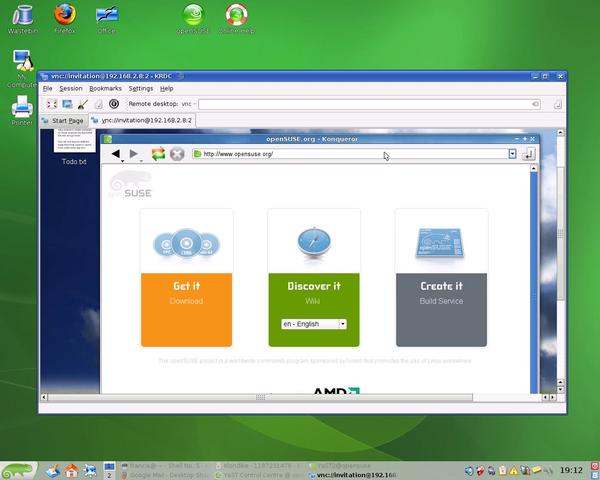
The distribution includes stable KDE4 applications such as the Kdrc VNC client with tabbed browsing...
More new features: Open Suse 10.3 boots faster than its predecessors. Benchmark tests are available online. The GCC compiler now has a "-fstack-protector" option to help detected buffer overflows. Linux Unified Key Setup (LUKS) is used by default for encrypted partitions, and Open Suse 10.3 supports the MP3 format in its standard media players, Banshee (v0.13.1) and Amarok (v1.4.7).
The Libzypp package management library replaces the Zenworks Management Daemon (ZMD) used previously. Libzypp is said to handle program dependencies better, and to support faster package download handling. To allow this to happen, standardized aliases are used for repositories. However, ZMD will remain available for Suse's enterprise products. Internally, Gnome has been moved from the optional software directory, "opt" to the system resource directory "/usr", which represents a status upgrade for the desktop.
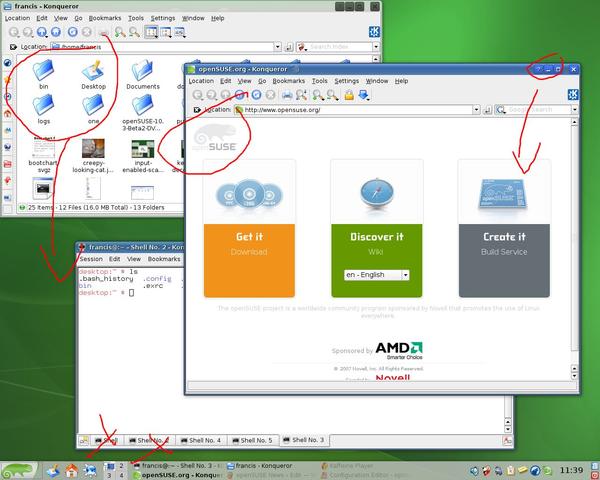
… and the Compiz Annotate plugin, if you enjoy the idea of painting the screen.
Opensuse.org offers various CD, DVD and update versions, including mini distributions and Gnome or KDE only versions, along with language CDs and non-OSS CDs. Spoil yourself for choice on the download page .
Subscribe to our Linux Newsletters
Find Linux and Open Source Jobs
Subscribe to our ADMIN Newsletters
Digital Autonomy
• How the Fediverse Found Parts for Its Platforms
• The Answer Was Already on the Shelf
• Changing the Chip Industry: How Public Investment Has Grown Open Silicon
• United Nations Open Source Portal Goes Live
• EU Open Source Strategy Plays Key Role in Tech Sovereignty Package
• France Says “Au Revoir” to Microsoft
Support Our Work
Linux Magazine content is made possible with support from readers like you. Please consider contributing when you’ve found an article to be beneficial.

News
-
openKylin 3.0 Released with Expanded AI Integration
The latest release features a pre-installed AI agent to help perform tasks.
-
DigitalOcean Ends Open Source Credits Program
In a change that has surprised many open source developers, DigitalOcean has decided to sunset its Open Source Credits Program.
-
Office 365 Available for Testing on Linux via Bottles
Linux users can now test the official Office 365, thanks to Mirko Brombin's work on Bottles.
-
Dutch Government Turns to Open Source for Digital Sovereignty
Following in the footsteps of other European countries, the Netherlands is looking to increase its sovereign digital infrastructure with open source software.
-
Linux May Soon Work on Snapdragon X2-Based PCs
If you're thinking about buying a Snapdragon X2-based desktop or laptop, Linux may soon be an option.
-
KDE for People Initiative Calls for AI Ban in Plasma
A new community of KDE wants the project to adopt a strict no-AI policy for KDE Plasma.
-
KDE Sets Ambitious Goals for 2026 and Beyond
KDE Connect reveals the goals for the Linux desktop darling, with one of those goals long overdue.
-
It’s Time to Test Fedora 45 Beta
Fedora 45 beta has been released with updated Gnome, KDE Plasma, and kernel.
-
Ubuntu Stonking Stingray Gets Even Rustier
Ubuntu 26.10 has completed its migration to the Rust-based coreutils.
-
AI Fixes Linux Bottlenecks Using “Hideous” Code
A Linux developer used AI to fix bottlenecks that caused problems when building the kernel. The resulting AI-generated code needed a lot of work.