


A Perl script controls Tmux configuration

Magical Window

Instead of manually rearranging windows in a development environment time and time again, the Tmux terminal multiplexer can restore them from a configuration script.
If you don't use a development environment such as Eclipse but mostly rely on the command line in a terminal, you will certainly be familiar with screen. Among other things, this legacy terminal utility ensures that, after network problems, the initiator of an aborted SSH session can continue without problems exactly where they stopped typing. The screen utility sits between users and applications running in the terminal and tricks the application into believing that an attentive user is still at the keyboard, even if they have long since left the office for a weekend break.
As you know, the Unix world has not stood still over the past 20 years, and a relatively young project named Tmux [2] has been set up to improve and replace Screen. Like Screen, Tmux offers the user several sessions, which in turn comprise windows; in Screen lingo, this does not mean desktop windows, but switchable text interfaces in the same terminal window. Using keyboard shortcuts, Tmux can subdivide each window again by creating vertically or horizontally arranged panes, all of which are visible at the same time (Figure 1).
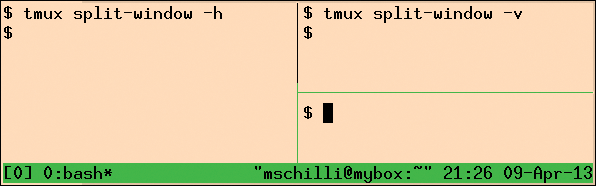 Figure 1: Two tmux commands divide the window into two horizontal panes, and then the right pane into two vertical panes.
[...]
Buy this article as PDF
(incl. VAT)
Buy Linux Magazine
Subscribe to our Linux Newsletters
Find Linux and Open Source Jobs
Subscribe to our ADMIN Newsletters
Digital Autonomy
• How the Fediverse Found Parts for Its Platforms
• The Answer Was Already on the Shelf
• Changing the Chip Industry: How Public Investment Has Grown Open Silicon
• United Nations Open Source Portal Goes Live
• EU Open Source Strategy Plays Key Role in Tech Sovereignty Package
• France Says “Au Revoir” to Microsoft
Support Our Work
Linux Magazine content is made possible with support from readers like you. Please consider contributing when you’ve found an article to be beneficial.

News
-
openKylin 3.0 Released with Expanded AI Integration
The latest release features a pre-installed AI agent to help perform tasks.
-
DigitalOcean Ends Open Source Credits Program
In a change that has surprised many open source developers, DigitalOcean has decided to sunset its Open Source Credits Program.
-
Office 365 Available for Testing on Linux via Bottles
Linux users can now test the official Office 365, thanks to Mirko Brombin's work on Bottles.
-
Dutch Government Turns to Open Source for Digital Sovereignty
Following in the footsteps of other European countries, the Netherlands is looking to increase its sovereign digital infrastructure with open source software.
-
Linux May Soon Work on Snapdragon X2-Based PCs
If you're thinking about buying a Snapdragon X2-based desktop or laptop, Linux may soon be an option.
-
KDE for People Initiative Calls for AI Ban in Plasma
A new community of KDE wants the project to adopt a strict no-AI policy for KDE Plasma.
-
KDE Sets Ambitious Goals for 2026 and Beyond
KDE Connect reveals the goals for the Linux desktop darling, with one of those goals long overdue.
-
It’s Time to Test Fedora 45 Beta
Fedora 45 beta has been released with updated Gnome, KDE Plasma, and kernel.
-
Ubuntu Stonking Stingray Gets Even Rustier
Ubuntu 26.10 has completed its migration to the Rust-based coreutils.
-
AI Fixes Linux Bottlenecks Using “Hideous” Code
A Linux developer used AI to fix bottlenecks that caused problems when building the kernel. The resulting AI-generated code needed a lot of work.