


KeeWeb: A Better Desktop and Web App for KeePass databases

Productivity Sauce
KeePass is one of the best password managers out there, but let's face it: the KeePass 2.x application written in Mono installs a huge number of dependencies and it looks anything but sleek on the Linux desktop. Enter KeeWeb, a lightweight desktop and web app that can handle .kdbx databases and features a polished user-friendly interface.
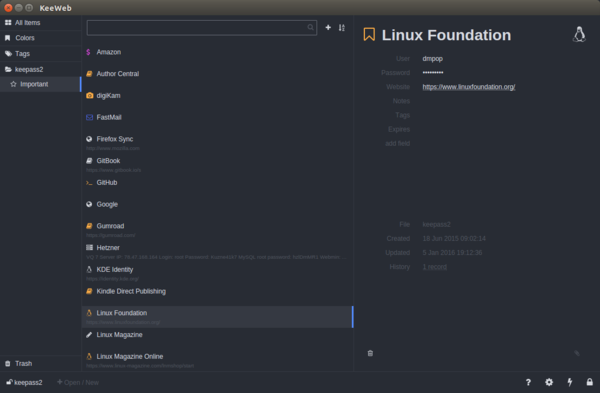
To run KeeWeb on a Linux desktop, grab the latest version of the app from the project's Releases page, unpack the downloaded archive, and run the KeeWeb executable binary. Open then the local .kdbx database, of link KeeWeb to Dropbox to work with databases stored on Dropbox. Instead of running KeeWeb locally, you can deploy it as a web app. To do this clone the project's GitHub repository to the document root of your server and switch to the gh-pages branch:
git clone https://github.com/antelle/keeweb.git
git checkout -t origin/gh-pages
KeeWeb puts all essential tool and features at your fingertips. You can open an existing .kdbx database or create a new one from scratch. The app conveniently remembers the recently used databases, you don't need to select them manually. It's possible to organize entries into groups as well as specify tags, colors, expiration, and custom fields for each entry. KeeWeb also supports keyboard shortcuts, and there are a handful of settings you can adjust to your liking. In short, if the official KeePass application is not your cup of tea, KeeWeb offers a lightweight and sleek alternative.
comments powered by DisqusSubscribe to our Linux Newsletters
Find Linux and Open Source Jobs
Subscribe to our ADMIN Newsletters
Digital Autonomy
• How the Fediverse Found Parts for Its Platforms
• The Answer Was Already on the Shelf
• Changing the Chip Industry: How Public Investment Has Grown Open Silicon
• United Nations Open Source Portal Goes Live
• EU Open Source Strategy Plays Key Role in Tech Sovereignty Package
• France Says “Au Revoir” to Microsoft
Support Our Work
Linux Magazine content is made possible with support from readers like you. Please consider contributing when you’ve found an article to be beneficial.

News
-
PwnEscape Poses VM Vulnerability
A guest-to-host escape flaw in Linux KVM, named PwnEscape, might be yet another means of attacking Linux.
-
Linux Mint 27 Set for a Christmas Release
The developers behind Linux Mint have announced a Christmas release, and it looks like Santa's sack will be brimming with features.
-
Is Linus Torvalds Vibe Coding?
The creator of Linux has added AI into his process for Linux kernel development, and it's more than just for debugging.
-
openKylin 3.0 Released with Expanded AI Integration
The latest release features a pre-installed AI agent to help perform tasks.
-
DigitalOcean Ends Open Source Credits Program
In a change that has surprised many open source developers, DigitalOcean has decided to sunset its Open Source Credits Program.
-
Office 365 Available for Testing on Linux via Bottles
Linux users can now test the official Office 365, thanks to Mirko Brombin's work on Bottles.
-
Dutch Government Turns to Open Source for Digital Sovereignty
Following in the footsteps of other European countries, the Netherlands is looking to increase its sovereign digital infrastructure with open source software.
-
Linux May Soon Work on Snapdragon X2-Based PCs
If you're thinking about buying a Snapdragon X2-based desktop or laptop, Linux may soon be an option.
-
KDE for People Initiative Calls for AI Ban in Plasma
A new community of KDE wants the project to adopt a strict no-AI policy for KDE Plasma.
-
KDE Sets Ambitious Goals for 2026 and Beyond
KDE Connect reveals the goals for the Linux desktop darling, with one of those goals long overdue.