


Is the Ghost CMS Ready to Replace WordPress?
Ghost Editor
The need for a good editor can't be overstated. A content management system (CMS) depends on efficient content delivery. Entering text, links, images, videos, and CSS styling can be very tricky sometimes, especially for beginners. Koenig (Figure 6) is a minimalistic editor that is very friendly to newcomers. In 2012, Ghost presented an "idealistic and fictional" solution to WordPress blog building complexity. Navigate to Dashboard | Posts | + and Ghost is ready to handle new content. You'll find options for custom URLs, dates, tags, and excerpts – all basic settings are included, but that's just the beginning.
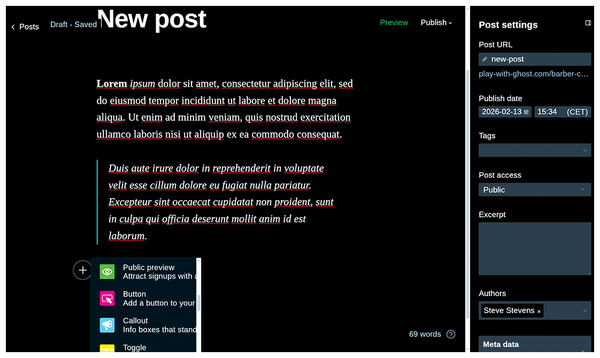 Figure 6: Ghost's Koenig editor offers efficient content entry and editing.
Special X and Facebook cards allow you to customize post previews (title, description, and cover) for social networks. Code injection lets you make the post or page design unique – for example, a "Happy Independence Day" post could appear with a flag in the background. In addition to standard HTML and Markdown formats, the Ghost editor supports image gallery and base image editing with rotate, flip, and crop options. You'll also find an option to insert buttons, video, and audio. Another interesting feature is Email Content, which is great for email promotional campaigns or special notifications for subscribers. You can limit visibility to members-only, paid members, or only for subscribers. Embedded cards help with media content previews from popular websites: YouTube, X, Spotify, SoundCloud, Vimeo, and others.
Ghost Themes
Ghost provides a lot of themes, free or paid, on the Themes Marketplace [12]. The default theme is Source (Figure 7); the previous default was Casper (as shown in Figure 1). The themes are organized into categories: Newsletter, Blog, News, Magazine, Podcast, Photography, Portfolio, and Official. Official themes are created and maintained by the Ghost team.
 Figure 7: Ghost's default Source theme.
Ghost theme format might be a little surprising for users who are accustomed to editing WordPress themes with HTML, CSS, and PHP. Ghost uses Handlebars [13], a simple templating language. Handlebars is similar to HTML, but it includes logic, and the code is very readable and easy to understand. Listing 2 shows the Author page code of the default Source theme. This page builds the author page from pieces: the picture, a bio, a list of publications, the author's social networks, and more. If there is no information about the publication's author, the bio section will be hidden automatically.
Listing 2
Ghost Theme – Author.hbs
{{!< default}}
{{!-- The tag above means: insert everything in this
   file into the body of the default.hbs template --}}
<main class="gh-main gh-outer">
    {{#author}}
      {{!--Inlude the publications info  --}}
        <section class="gh-archive{{#if @custom.show_publication_info_sidebar}}
                 has-sidebar{{/if}} gh-inner">
         <div class="gh-archive-inner">
         <div class="gh-archive-wrapper">
         <h1 class="gh-article-title is-title">
         {{!--Show the author's website if available  --}}
         {{#if website}}
            <a class="gh-author-social-link" href="{{website}}"
            target="_blank" rel="noopener">{{name}}</a>
         {{else}}
           {{name}}
         {{/if}}
           </h1>
         {{!--Show the bio if available  --}}
         {{#if bio}}
           <p class="gh-article-excerpt">{{bio}}</p>
         {{/if}}
           <footer class="gh-author-meta">
           <div class="gh-author-social">
         {{!--Show social networks if available  --}}
         {{#if twitter}}
            <a class="gh-author-social-link" href="{{social_url type="twitter"}}"
             target="_blank" rel="noopener">{{> "icons/twitter"}}</a>
        {{/if}}
        {{#if facebook}}
         <a class="gh-author-social-link" href="{{social_url type="facebook"}}"
        target="_blank" rel="noopener">{{> "icons/facebook"}}</a>
        {{/if}}
        {{#if linkedin}}
         <a class="gh-author-social-link" href="{{social_url type="linkedin"}}"
         target="_blank" rel="noopener">{{> "icons/linkedin"}}
         </a>
        {{/if}}
        {{#if bluesky}}
          <a class="gh-author-social-link" href="{{social_url type="bluesky"}}"
          target="_blank" rel="noopener">{{> "icons/bluesky"}}</a>
        {{/if}}
        {{#if threads}}
        <a class="gh-author-social-link" href="{{social_url type="threads"}}"
        target="_blank" rel="noopener">{{> "icons/threads"}}</a>
        {{/if}}
        ...
        </div>
         {{!--Show location if available  --}}
        {{#if location}}
          <div class="gh-author-location">{{location}}</div>
        {{/if}}
      </footer>
    </div>
    {{!--Show author's profile image if available  --}}
    {{#if profile_image}}
    <img class="gh-article-image"
         src="{{img_url profile_image size="s"}}"
         alt="{{name}}">
    {{/if}}
         </div>
        </section>
    {{/author}}
    {{!--Show list of posts by author  --}}
    {{> "components/post-list" feed="archive" postFeedStyle=@custom.post_feed_style
    showTitle=false showSidebar=@custom.show_publication_info_sidebar}}
</main>
ActivityPub
In the world of insane amounts of online content, you might be wondering if there is some middle ground between individual websites and indexers like Google and Bing. ActivityPub, a protocol and open standard, is designed to be that middle ground. It provides an API for creating and modifying content and a server-to-server protocol for delivering notifications and content. The ActivityPub protocol is a key component of the ecosystem of free social networking tools known as the Fediverse. Figure 8 demonstrates Ghost's support of ActivityPub. A presentation at the Ghost website offers more information on using ActivityPub with Ghost [14].
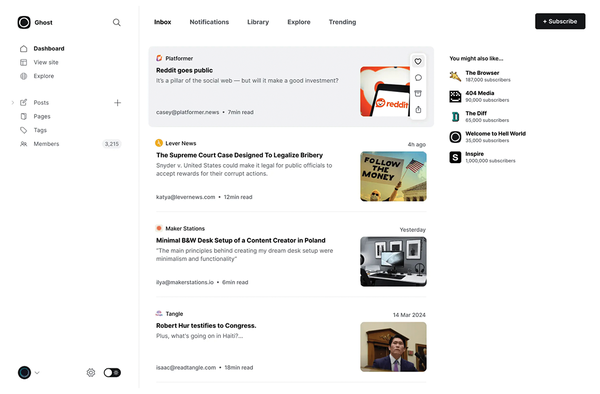 Figure 8: Ghost supports the decentralized ActivityPub social networking protocol.
« Previous 1 2 3 Next »
Buy this article as PDF
(incl. VAT)
Buy Linux Magazine
Subscribe to our Linux Newsletters
Find Linux and Open Source Jobs
Subscribe to our ADMIN Newsletters
Digital Autonomy
• How the Fediverse Found Parts for Its Platforms
• The Answer Was Already on the Shelf
• Changing the Chip Industry: How Public Investment Has Grown Open Silicon
• United Nations Open Source Portal Goes Live
• EU Open Source Strategy Plays Key Role in Tech Sovereignty Package
• France Says “Au Revoir” to Microsoft
Support Our Work
Linux Magazine content is made possible with support from readers like you. Please consider contributing when you’ve found an article to be beneficial.

News
-
System76 Announces the New Thelio Prime Desktop
The makers of the Thelio desktop line and Pop!_OS have released a powerful small form factor PC.
-
A Must See KDE Documentary
It doesn't matter what desktop environment you prefer, this KDE documentary should top your list of things to watch.
-
New KORA Linux Distro to Harness the Power of Local AI
The development team behind CyanogenMod, Android, and Playtron unveils KORA, a Linux distribution built specifically for AI nerds.
-
Epic Games Targets Linux for New Launcher
The Epic Games new launcher is still in preview, but it looks to land on several Linux distributions.
-
Fedora 45 Now Available
The latest iteration of Fedora has arrived with Gnome 51 and KDE Plasma 6.8.
-
Linux 7.4 is "Much Healthier" Thanks to AI
At nearly 42 million lines, Linux 7.4 is the largest merge in the kernel’s history.
-
Working Exploit for a Linux Kernel Flaw Made Public
Even before a bug received its CVE identifier or an upstream fix, the local privilege escalation vulnerability exploit found its way into the wild.
-
r/opensource Bans AI-Assisted and AI-Related Projects
The de facto subreddit for all things open source has not only banned AI-related projects but also users who "don't speak English."
-
Bottlenecks Discovered by Meta Engineers Lead to Scalability Improvements
Thanks to a small group of engineers at Meta, the Linux kernel module kernfs has been improved, which has led to some serious gains.
-
PwnEscape Poses VM Vulnerability
A guest-to-host escape flaw in Linux KVM, named PwnEscape, might be yet another means of attacking Linux.